1
Add it to Chrome
Open Peeksolve in the Chrome Web Store, click Add to Chrome, then Add extension. Edge, Brave, Arc and other Chromium browsers work the same way.
Install it, answer four quick questions, press one shortcut. Every step is on this page, with short videos of the real thing.
No settings to fiddle with and no card needed. Peeksolve sets itself up from your answers.
Open Peeksolve in the Chrome Web Store, click Add to Chrome, then Add extension. Edge, Brave, Arc and other Chromium browsers work the same way.
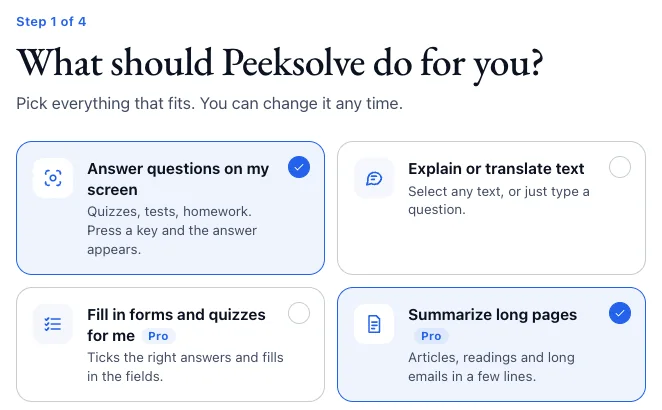
Click the Peeksolve icon in Chrome’s toolbar (behind the puzzle piece until you pin it) and start the setup. Tell it what you need, which subjects and how answers should look. Peeksolve sets everything up from that.
Already have an account? Click Sign in on the first page and your settings come back.
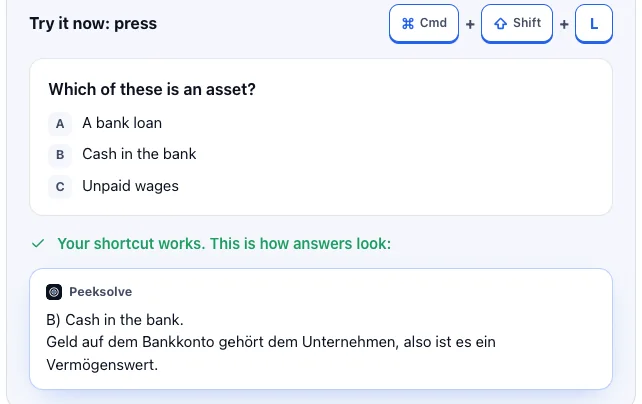
Sign in with Google or your email: 5 free answers a day. The last page gives you a practice question. Press ⌘⇧L and the answer appears.
Short videos of the real extension. The keys you would press appear at the bottom.
For tests, quizzes and anything you can see: text, maths, charts and pictures.
Only part of the page? Turn on “Crop area” in the Peeksolve menu, then drag a box around the question.
When you don’t understand something you are reading.
Translations too: select a sentence in any language and press the same keys.
Like a chat, right on the page you are on.
Got a picture? Paste it into the box (⌘V) or drag it in, then ask about it.
Peeksolve reads every question on the page and fills in the answers: choices, dropdowns and text.
Just one question? Click into that field first, then press the keys. Want it to fill in without asking? Settings → Auto-fill → “Fill in right away”.
God Mode fills in each page and clicks “Next” for you, until the end.
Stop it any time with Esc. Prefer to click “Next” yourself? Settings → Auto-fill → “One page at a time”.
Articles, readings and long emails in a few sentences.
No keys yet? Settings → Shortcuts → “Summarize this page” → Change.
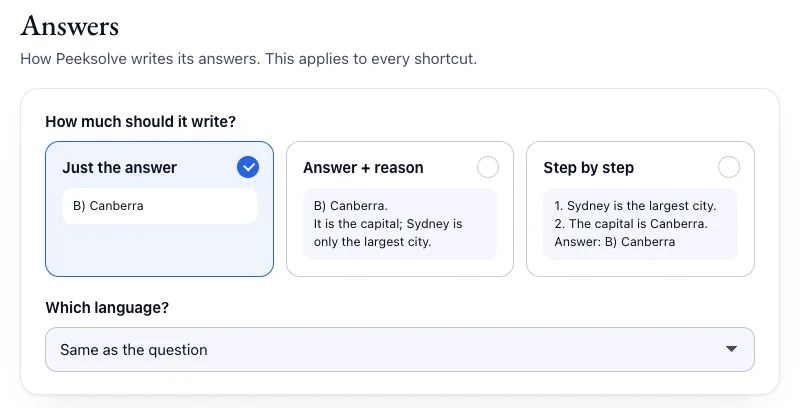
Click the Peeksolve icon in your toolbar, then the gear. Everything saves by itself.
Want to start over? Settings → “Run setup again” asks the four questions again.
Another app or extension may be using the same keys. Open Peeksolve’s Settings → Shortcuts and click Test my shortcuts. If a shortcut doesn’t arrive, click Change and pick other keys. You can also set them at chrome://extensions/shortcuts.
You are not signed in yet. Click Set up Peeksolve in that message, or click the Peeksolve icon in your toolbar. It takes about a minute.
Chrome doesn’t let any extension read its own pages: new tabs, settings, chrome:// pages and the Chrome Web Store. PDFs opened in Chrome’s built-in PDF viewer can’t be read either. Normal websites, online quizzes and learning platforms all work.
Chrome blocks files on your computer until you allow it once: open chrome://extensions, click Details under Peeksolve and turn on Allow access to file URLs.
The free plan has 5 answers a day, and they come back at midnight (UTC). Need more today? A Day Pass unlocks everything for 24 hours; Pro has no daily limit. See pricing.
Drag it by its top edge to move it, drag a corner to make it bigger or smaller, and press Esc to close it. Text size and colors are in Settings → Look.
Settings → Answers: choose “Just the answer”, “Answer + reason” or “Step by step”, and the language you want. It applies to every shortcut.
Write to [email protected]. A real person answers, usually the same day.
chrome://extensions and turn on Developer mode at the top right.This copy doesn’t update by itself. The Chrome Web Store version does, so use that one if you can.